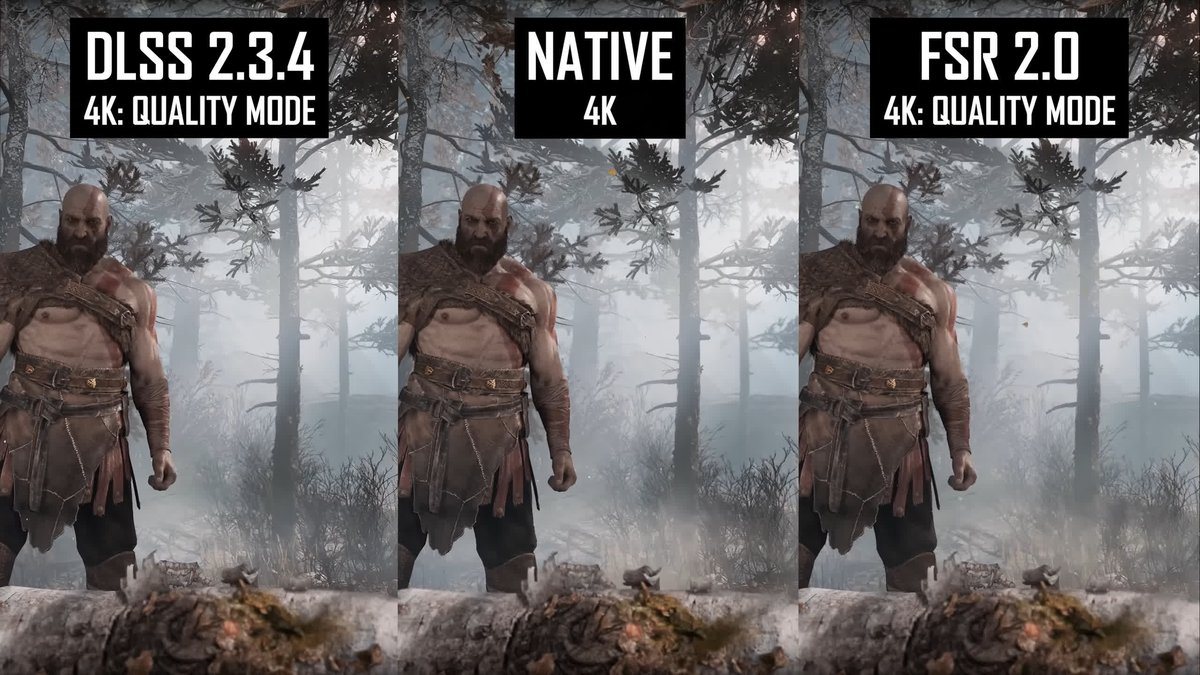
When every frame counts, and crystal-clear visuals are non-negotiable, gamers are constantly looking for an edge. You’ve heard the buzz: technologies like NVIDIA’s DLSS and AMD’s FSR promise to boost your game’s performance without sacrificing fidelity. But the landscape has gotten a bit more complex with the advent of Frame Generation. So, what’s the real deal with Frame Generation vs. Upscaling (DLSS/FSR): Key Differences and When to Use Each? Let’s break down these game-changing innovations.
It’s not just about pushing more pixels anymore; it’s about smarter rendering. Understanding the core mechanics behind upscaling and frame generation will not only empower your gaming experience but also help you make informed decisions about your hardware and settings.
At a Glance: Understanding the Core Technologies
- Upscaling (DLSS 1.0-2.0, FSR 1.0-2.0+): Renders games at a lower internal resolution and then intelligently reconstructs them to your display’s native resolution. Think of it as painting a smaller canvas and then stretching it out, filling in the blanks with smart algorithms or AI. It reduces the work your GPU has to do per frame.
- Frame Generation (DLSS 3.0+, FSR 3.0+): Creates entirely new, interpolated frames and inserts them between frames actually rendered by your GPU. This significantly increases your displayed frame rate but doesn't reduce the GPU's workload for the base frames.
- DLSS (NVIDIA Deep Learning Super Sampling): Leverages AI and dedicated Tensor Cores on NVIDIA RTX GPUs for superior image quality and advanced features like Ray Reconstruction. Requires NVIDIA RTX hardware.
- FSR (AMD FidelityFX Super Resolution): An open-source, algorithm-based solution that works on a much wider range of GPUs (AMD, NVIDIA, and even older cards). Offers broad compatibility at competitive performance.
- Key Differences: Upscaling focuses on reconstructing existing frames; Frame Generation creates new ones. Frame Generation inherently adds a slight latency, whereas upscaling's latency impact is negligible.
- When to Use Each: Depends on your hardware, game type, and priorities. If you have an RTX 40 series card, you get the best of both worlds. For other cards, careful consideration is needed.
The Everlasting Quest for More Frames and Better Fidelity
Remember those days when hitting 60 frames per second (FPS) at 1080p was the holy grail? Now, with stunning 4K monitors, high-refresh-rate displays, and increasingly complex game worlds, our graphics cards are under immense pressure. Ray tracing, in particular, can bring even the beefiest GPUs to their knees. This is where upscaling and frame generation step in, acting as digital superheroes for your frame rate.
The core problem is simple: rendering more pixels takes more power. Higher resolutions mean more pixels. Complex lighting (like ray tracing) means more calculations per pixel. Gamers want both high resolution and smooth frame rates. Without these technologies, the only solutions are either downgrading graphics settings, buying ever-more expensive hardware, or simply accepting lower FPS.
Demystifying Upscaling: The Smart Resize
Upscaling technologies like DLSS and FSR tackle the problem by reducing the number of pixels your GPU actually has to render. Instead of rendering your game at, say, native 4K (3840x2160 pixels), they might render it internally at 1440p (2560x1440 pixels). Once rendered, a sophisticated algorithm or AI then scales that lower-resolution image up to your display’s native resolution, intelligently filling in the missing pixel data.
This process significantly lessens the load on your GPU, allowing it to complete frames faster, thereby boosting your frame rate. The magic lies in how they reconstruct that image to look as close to native resolution as possible, or sometimes even better.
NVIDIA DLSS: The AI Advantage
NVIDIA's Deep Learning Super Sampling (DLSS) is at the forefront of AI-powered upscaling. It’s not just a simple image resize; it uses deep learning neural networks trained on supercomputers to predict what a high-resolution image should look like based on a lower-resolution input.
- How it Works: DLSS utilizes the dedicated Tensor Cores found in NVIDIA RTX GPUs. These cores are specifically designed for AI and machine learning tasks. DLSS takes multiple frames (temporal data) and motion vectors from the game engine, feeding them into its AI model. This model then reconstructs a sharp, high-resolution image, effectively applying anti-aliasing and image enhancement in the process.
- Versions & Evolution:
- DLSS 1.0 (2018): The first iteration, introduced with the RTX 20 series. It required per-game AI training, leading to limited game support and modest visual improvements.
- DLSS 2.0 (2020): A massive leap forward. It became a generalized AI model, no longer requiring per-game training, which vastly expanded game compatibility. It delivered impressive image quality and significant performance gains. This is the foundation for most modern DLSS experiences.
- DLSS 3.0 (2022): This is where Frame Generation enters the scene, in addition to upscaling. Introduced with RTX 40 series GPUs, it uses an 'Optic Flow Frame Generation' model to create entirely new, interpolated frames. We'll dive deeper into this soon.
- DLSS 3.5 (2023): Further refines the technology, especially for ray tracing. It adds 'Ray Reconstruction,' an AI-powered neural renderer trained on five times more data than DLSS 3, which enhances the quality of ray-traced effects by replacing traditional denoisers. This also requires RTX 40 series GPUs.
- Presets: DLSS offers various quality presets (e.g., Ultra Quality, Quality, Balanced, Performance, Ultra Performance). These simply dictate the internal render resolution, with 'Ultra Quality' rendering at a higher internal resolution for better fidelity and 'Ultra Performance' rendering at a much lower resolution for maximum FPS.
- Advantages: Generally offers superior image quality due to its AI nature, robust anti-aliasing, and advanced features like Ray Reconstruction. Leads to higher frame rates while maintaining a sharp image.
- Limitations: Exclusively tied to NVIDIA RTX GPUs (RTX 20 series and higher for upscaling; RTX 40 series for Frame Generation and Ray Reconstruction). It's proprietary, not open-source, and has higher processing demands due to the AI inference. Can occasionally introduce minor artifacts, especially in very complex or fast-moving scenes, though these are increasingly rare.
AMD FSR: The Algorithmically Agile Alternative
AMD's FidelityFX Super Resolution (FSR) is the open-source challenger. Unlike DLSS, FSR doesn't rely on dedicated AI hardware. Instead, it uses sophisticated spatial upscaling algorithms to achieve its results. This makes it incredibly versatile.
- How it Works: FSR primarily processes a single lower-resolution frame and then uses an advanced algorithm (like Lanczos in FSR 1.0, or more complex temporal data in FSR 2.0 and later) to sharpen and reconstruct it to a higher resolution. It doesn't need machine learning or specific AI cores.
- Versions & Evolution:
- FSR 1.0 (2021): The initial release. Used a spatial upscaling algorithm combined with a sharpening filter. It offered a good performance boost but its image quality was often described as softer than native or DLSS, particularly with shimmering artifacts.
- FSR 2.0 (2022): A significant upgrade, moving to a temporal upscaling approach, similar in concept to DLSS 2.0 but without the AI. This greatly improved image quality, often replacing the game’s anti-aliasing solution.
- FSR 2.1/2.2: Incremental improvements, addressing common visual issues like "ghosting" (trails behind moving objects) and refining image stability and color accuracy.
- FSR 3.0 (2023): AMD's answer to NVIDIA's Frame Generation, introducing 'Frame Interpolation' alongside its upscaling. It can also provide a 'Native AA' quality mode, where it only applies anti-aliasing without upscaling.
- FSR 3.1 (2024): An upgrade to FSR 3.0, aimed at further improving image quality, stability, and artifact reduction for the interpolated frames.
- Presets: Similar to DLSS, FSR offers presets like Native AA, Ultra Quality, Quality, Balanced, Performance, and Ultra Performance, controlling the internal render resolution.
- Advantages: Its biggest strength is its broad hardware compatibility. FSR works on a vast array of GPUs, including AMD Radeon cards (from RX 400 series up), NVIDIA GeForce cards (GTX 10 series and newer, including non-RTX cards), and even integrated graphics. It's open-source, making it accessible and flexible for developers. It provides a good frame rate boost across diverse hardware.
- Limitations: While FSR 2.0+ significantly improved, its image quality is often considered slightly behind DLSS in direct comparisons, especially at lower internal render resolutions. Potential for visual artifacts like ghosting, shimmering, aliasing, and moiré patterns, though these are continually being improved with each version. Performance on very low-end hardware might still be limited.
Performance Head-to-Head (Upscaling, Quality Preset)
When looking at the pure upscaling capabilities (i.e., comparing DLSS 2.0/3.0 without Frame Generation to FSR 2.0/3.0 without Frame Interpolation), the performance boosts are quite similar. Let's look at some average figures with an RTX 3060 at 1080p, Max Settings, using a Quality Preset:
| Game | FSR Avg. FPS (1% Low) | DLSS Avg. FPS (1% Low) |
|---|---|---|
| Cyberpunk 2077 | 67 FPS (56) | 69 FPS (58) |
| Star Wars Jedi Survivor | 74 FPS (50) | 75 FPS (48) |
| Dead Space | 96 FPS (69) | 98 FPS (69) |
| Spider-Man Miles Morales | 74 FPS (63) | 75 FPS (64) |
| Hogwarts Legacy | 85 FPS (58) | 89 FPS (62) |
| Conclusion for Upscaling: Both technologies deliver substantial and comparable performance increases. DLSS generally holds a marginal lead in raw FPS, particularly as resolutions climb, and often maintains slightly better 1% low frame rates, leading to a smoother overall experience. |
Entering the Fourth Dimension: Frame Generation
This is where things get truly exciting – and a bit more complex. While upscaling works by rendering fewer original frames, Frame Generation (NVIDIA's 'Optic Flow Frame Generation' in DLSS 3.0+ and AMD’s 'Frame Interpolation' in FSR 3.0+) adds entirely new frames that were never rendered by your GPU at all.
Imagine your GPU renders frame A and then frame B. Frame Generation steps in and creates an entirely new frame, call it frame A.5, and inserts it between A and B. It does this by analyzing the rendered frames and predicting how objects and motion should appear in that interpolated moment.
How Frame Generation Works
- NVIDIA DLSS 3.0+ (Optic Flow): NVIDIA's approach uses a dedicated AI model called Optical Flow Acceleration. This model analyzes two sequential frames from the game and the game's motion vectors to understand how elements in the scene are moving. It then generates an intermediate frame, almost like a highly intelligent "tweening" animation process. This requires the newer NVIDIA RTX 40 series GPUs because it leverages their advanced Optical Flow Accelerators and Tensor Cores.
- AMD FSR 3.0+ (Frame Interpolation): AMD's method uses a similar concept of motion vectors and temporal data to create interpolated frames. While it doesn't use dedicated AI cores in the same way as NVIDIA, it relies on advanced algorithms to analyze motion and generate intermediate frames. This makes it more broadly compatible, but the quality of the interpolated frames can vary.
The Magic and the Catch
The immediate benefit of Frame Generation is a dramatic increase in your displayed frame rate, often doubling it. If your game is bottlenecked by your GPU, Frame Generation can push your FPS much higher than upscaling alone.
However, there's a crucial catch: latency. Since these frames are generated between actual rendered frames, they don't reflect your most immediate input. For instance, if you move your mouse, the interpolated frame won't perfectly reflect that input as quickly as a natively rendered frame would. This introduces a slight but measurable increase in input latency. For casual single-player games, this might be imperceptible or easily mitigated with NVIDIA Reflex or AMD Anti-Lag, which helps reduce overall system latency. For competitive esports, however, it can be a deal-breaker. This is a key reason why some players might wonder, is frame generation truly bad?. The answer isn't a simple yes or no; it depends heavily on your use case and sensitivity.
Upscaling vs. Frame Generation: The Core Differences Unpacked
Let's distill the fundamental distinctions to help you decide.
| Feature | Upscaling (DLSS 1.0-2.0, FSR 1.0-2.0+) | Frame Generation (DLSS 3.0+, FSR 3.0+) |
|---|---|---|
| Fundamental Goal | Render fewer pixels, reconstruct to boost rendered FPS | Generate new frames to boost displayed FPS beyond rendered frames |
| Mechanism | Renders game at lower resolution, then intelligently scales up. | Creates interpolated frames between existing rendered frames. |
| GPU Workload | Reduces GPU workload per frame. | Does not reduce GPU workload for base frames; adds new frames on top. |
| Performance Gain | Significant boost in rendered frames. | Massive boost in displayed frames, often doubling FPS. |
| Latency Impact | Minimal to negligible. | Introduces a slight but measurable increase in input latency. |
| Image Quality | Aims to match or exceed native clarity; can vary by implementation. | Quality of interpolated frames can vary; can introduce specific artifacts (e.g., UI glitches, rapid motion blur). |
| Hardware Req. | DLSS: RTX 20 series+; FSR: Broad GPU support. | DLSS: RTX 40 series only; FSR: Broad GPU support (but works best on newer cards). |
| Best Use Case | Boosting FPS with minimal latency impact, enhancing visual quality. | Maximizing displayed FPS in GPU-bound scenarios, especially in single-player games where latency is less critical. |
DLSS vs. FSR: The Platform Wars Continue
While both DLSS and FSR offer both upscaling and frame generation capabilities in their latest iterations, their underlying technologies and compatibility paint different pictures.
Technology & Approach
- DLSS: Relies heavily on AI and dedicated hardware (Tensor Cores). This allows for extremely complex, data-driven image reconstruction and generation. The AI is constantly learning and improving, which is why NVIDIA can roll out features like Ray Reconstruction. Its non-open-source nature means tight integration and optimization with NVIDIA's ecosystem.
- FSR: Primarily algorithm-based and open-source. It achieves impressive results without needing specialized AI hardware, making it accessible to a much wider audience. While its algorithms are sophisticated and increasingly leverage temporal data, it doesn't have the same AI-driven "predictive" power as DLSS.
Image Quality
Generally speaking, when comparing upscaling (DLSS 2.0+ vs. FSR 2.0+), DLSS often holds a slight edge in image quality, especially at lower internal render resolutions. This is particularly noticeable in fine details, text, and anti-aliasing, where DLSS's AI can often produce a cleaner, sharper image with fewer artifacts like shimmering or ghosting. DLSS 3.5's Ray Reconstruction also significantly improves ray-traced visuals.
FSR, especially in its 2.x iterations, has closed the gap considerably and can look very good, sometimes indistinguishable from DLSS in motion, particularly at higher quality presets. However, it can still occasionally exhibit more noticeable artifacts like subtle ghosting around fast-moving objects or shimmering on distant details. AMD is continually refining FSR to address these issues.
When it comes to Frame Generation, both DLSS 3.0 and FSR 3.0 can introduce some artifacts in the generated frames, though both are improving rapidly. NVIDIA's solution, backed by dedicated hardware, often produces slightly more consistent and higher-quality generated frames.
Compatibility: The Deciding Factor for Many
This is the biggest differentiator:
- FSR: The champion of compatibility. It works on virtually any modern GPU, including AMD Radeon cards (RX 400 series and newer), NVIDIA GeForce cards (GTX 10 series and newer, including non-RTX models), and even Intel Arc GPUs. FSR 3.0's Frame Interpolation is also broadly compatible, though its performance and image quality will naturally be best on newer, more powerful hardware.
- DLSS: Exclusive to NVIDIA RTX GPUs. For DLSS 1.0/2.0 upscaling, you need an RTX 20 series card or newer. For DLSS 3.0+ (Frame Generation and Ray Reconstruction), you specifically need an RTX 40 series GPU due to its reliance on the latest Tensor Cores and Optical Flow Accelerators. If you don't have an RTX card, DLSS is simply not an option.
When to Use Each: Your Practical Decision Guide
Choosing between these powerful technologies, and deciding whether to enable Frame Generation, boils down to your specific hardware, the game you’re playing, and your personal priorities.
1. Assess Your Hardware
- You have an NVIDIA RTX 40 Series GPU (e.g., RTX 4070, 4080, 4090): Congratulations, you have access to the full suite of NVIDIA's innovations, including DLSS 3.0 with Frame Generation and DLSS 3.5 with Ray Reconstruction.
- Recommendation: Start with DLSS (upscaling) enabled. Experiment with
QualityorBalancedpresets. If you want even more frames, especially in graphically demanding single-player games, enable Frame Generation. - Consideration: For highly competitive games where every millisecond of input latency matters, you might prefer just DLSS upscaling, or even turning both off if your native FPS is already very high. NVIDIA Reflex is crucial here to mitigate latency.
- You have an NVIDIA RTX 20 or 30 Series GPU (e.g., RTX 2060, 3070): You have access to DLSS 1.0/2.0 upscaling. You do not have access to DLSS 3.0's Frame Generation or DLSS 3.5's Ray Reconstruction.
- Recommendation: Enable DLSS (upscaling). This is your best bet for boosting performance and image quality. Experiment with presets. If the game also supports FSR, try both and see which one looks better to your eye on your system (DLSS typically wins for image quality).
- Consideration: You cannot use NVIDIA's Frame Generation. If you still crave more frames, and the game supports FSR 3.0, you could technically use FSR 3.0's Frame Interpolation. However, this is less common and might lead to a less optimized experience. Stick to DLSS upscaling where available.
- You have an AMD Radeon GPU (RX 400 series up, including newer RX 6000/7000 series): You have access to FSR. If you have a newer RDNA3 card (RX 7000 series), you'll get the best experience with FSR 3.0's Frame Interpolation.
- Recommendation: Enable FSR (upscaling). This will give you a significant performance boost across the board. Experiment with
QualityorBalancedpresets. - Consideration: If the game supports FSR 3.0, enable Frame Interpolation for a massive FPS jump, especially if you're GPU-bound. Just be mindful of the added latency, particularly in competitive titles. Use AMD Anti-Lag to help.
- You have an Older NVIDIA GTX GPU, Intel Arc, or an older AMD GPU: You have access to FSR (upscaling) and, if the game supports it, FSR 3.0's Frame Interpolation. You do not have access to DLSS.
- Recommendation: Enable FSR (upscaling). This is your only option for performance enhancement via these technologies, and it will likely be transformative for your frame rates.
- Consideration: For FSR 3.0's Frame Interpolation, while compatible, its effectiveness and image quality might be more inconsistent on older or lower-end hardware compared to newer GPUs. Use it if your FPS is struggling, but manage expectations regarding potential artifacts.
2. Consider the Game Genre
- Fast-Paced Competitive Games (e.g., CS2, Valorant, Overwatch 2):
- Upscaling: Use with caution. While a higher FPS is good, any potential input latency from upscaling (though often minimal) can be a disadvantage. Prioritize native resolution if your GPU can handle it. If not, use
Ultra QualityorQualitypresets. - Frame Generation: Generally NOT recommended. The added input latency, even if small, can negatively impact your reaction time and aim. Maximize your actual rendered frames.
- Immersive Single-Player/Cinematic Games (e.g., Cyberpunk 2077, Alan Wake 2, Starfield):
- Upscaling: Highly recommended. These games often push graphics to the limit, and upscaling can maintain beautiful visuals at playable frame rates. Prioritize
QualityorBalancedpresets. - Frame Generation: Highly recommended if you have compatible hardware. The dramatic FPS increase will make the experience incredibly smooth, and the slight latency increase is far less noticeable or critical in non-competitive scenarios.
- Open World/Exploration Games (e.g., Hogwarts Legacy, Assassin's Creed):
- Upscaling: Very useful for maintaining high frame rates across varied environments.
- Frame Generation: Beneficial, similar to single-player games, for ensuring a consistently smooth experience, especially in dense areas.
3. Your Personal Priority: FPS vs. Quality
- Priority: Maximize FPS at all costs (e.g., for high-refresh-rate monitors):
- Enable upscaling (DLSS or FSR) using a
PerformanceorUltra Performancepreset. - If compatible and in a non-competitive game, enable Frame Generation.
- Priority: Best Possible Image Quality (even if it means slightly lower FPS):
- Use upscaling (DLSS or FSR) with an
Ultra QualityorQualitypreset. - You might choose to forgo Frame Generation if you're sensitive to artifacts, even if it means lower FPS.
- Priority: A Balanced Experience:
- Enable upscaling (DLSS or FSR) using a
QualityorBalancedpreset. - If compatible and in a non-competitive game, enable Frame Generation and use latency reduction technologies (NVIDIA Reflex, AMD Anti-Lag).
Quick Tip: You Cannot Use DLSS and FSR Simultaneously
It’s a common misconception that you can stack these technologies. A game will offer either DLSS, FSR, or both. If both are available, you choose one or the other. You cannot enable DLSS upscaling and FSR frame generation at the same time, for example. You pick the suite that works best for your hardware and preferences within that game.
Addressing Common Questions & Misconceptions
- "Frame Generation just creates fake frames."
While the frames are "generated" and not natively rendered, they're far from fake. They are intelligently interpolated based on real motion data and provide a tangible increase in visual fluidity. The real concern is latency, not fakeness. - "Upscaling makes everything blurry."
This was more true for early FSR 1.0 and DLSS 1.0. Modern upscaling (DLSS 2.0+ and FSR 2.0+) is incredibly sophisticated. InQualityorBalancedmodes, it's often hard to distinguish from native resolution, and in some cases, DLSS can even appear sharper due to superior anti-aliasing. - "My low-end GPU will magically run 4K with these technologies."
While they provide significant boosts, these technologies work best when your GPU already has a decent baseline performance. Trying to push 4K on a very low-end card might still result in low FPS even withUltra Performancepresets, and image quality will suffer dramatically. They are enhancers, not miracle workers. - "DLSS is always better than FSR."
For pure image quality, especially at aggressive upscaling ratios, DLSS often has an edge due to its AI nature and dedicated hardware. However, FSR 2.0+ is very competitive, and its broad compatibility makes it the only option for a vast number of gamers. FSR 3.0's Frame Interpolation is also a strong contender, democratizing frame generation for many. The gap is shrinking, and for many users, the difference is negligible. - "Frame Generation replaces my need for a powerful CPU."
Not entirely. Frame Generation primarily addresses GPU bottlenecks. If your CPU is struggling to deliver a good base frame rate, Frame Generation might not deliver its full potential or might even exacerbate stuttering if the CPU can't feed the GPU enough frames to interpolate from. You still need a balanced system.
The Future of Gaming Performance
The pace of innovation in this space is astounding. FSR is rapidly improving and gaining ground, continually refining its image quality and feature set. We can expect future iterations of both DLSS and FSR to further minimize artifacts, reduce latency, and integrate even more seamlessly into game engines. Hardware requirements for frame generation might also become more accessible over time. The ultimate goal for both companies is to deliver an experience that feels and looks native, regardless of the internal rendering resolution, providing a future where gamers don't have to choose between performance and visual fidelity.
Empowering Your Play: Make the Smart Choice
You now have a solid understanding of the intricate world of upscaling and frame generation. These aren't just buzzwords; they're powerful tools designed to enhance your gaming experience.
The core takeaway is clear:
- If you have an NVIDIA RTX 40 series card, use DLSS upscaling and enable Frame Generation for the ultimate performance boost in single-player games.
- If you have an older NVIDIA RTX card, use DLSS upscaling.
- If you have an AMD card or a non-RTX NVIDIA card, FSR (upscaling) is your go-to, and FSR 3.0 (Frame Interpolation) is a strong option for massive FPS gains if supported, especially in cinematic titles.
Always start with theQualityorBalancedpreset for upscaling, and if you're not satisfied with the FPS, then explorePerformanceorUltra Performance. When enabling Frame Generation, experiment to ensure the added frames don't introduce noticeable latency or distracting artifacts for your specific playstyle.
Don't let your hardware hold you back from stunning visuals and smooth gameplay. With DLSS and FSR, you're empowered to fine-tune your settings, push your games further, and truly enjoy the bleeding edge of interactive entertainment. Happy gaming!